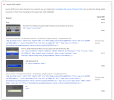
CLS in Elementor: what PSI is actually complaining about From your screenshot, PSI is flagging
“Unsized image element” and the HTML shown is the giveaway:
- Your images have width/height attributes…
- …but the initial src is a tiny inline SVG placeholder (e.g.
src="data:image/svg+xml,...") - The real image is only applied later via
data-lazy-src / data-lazy-srcset
That pattern often still causes CLS because the browser lays out the placeholder, then swaps in the real image and recalculates layout (especially inside flex containers / Elementor containers).
Also, replacing padding with a spacer rarely fixes CLS if the shift is coming from images, fonts, sticky headers, or late-injected widgets.
Before changes:
take a full backup (files + DB) or at least create a restore point in your host.
Step 1 — Identify which lazy-load is doing this Elementor has its own “lazy load background images”, WordPress has native lazy-loading, and many performance plugins (WP Rocket, LiteSpeed Cache, Autoptimize, SG Optimizer, Perfmatters, etc.) rewrite images to placeholders.
Check:
- Elementor → Settings → Experiments (and Features) for anything related to optimized image loading / lazy load
- Your performance plugin settings for LazyLoad images and LazyLoad CSS background images
- View source and confirm if images are being rewritten to
src="data:image/svg+xml..." with data-lazy-src=...
If a plugin is doing the rewrite, fix it there (best option).
Step 2 — Exclude “above the fold” images from lazy-load The biggest CLS wins usually come from excluding:
- Hero image(s)
- Logos in the header
- Any image visible without scrolling (especially in the section PSI highlights)
How you do this depends on the plugin, but most have:
- “Exclude images from lazyload by CSS selector”
- “Exclude by class”
- “Exclude first X images”
Good selectors to try (adjust to match your hero section):
Code:
.e-con-inner img
.elementor-top-section img
header img
If you can target only the hero image widget, even better:
- Edit the image widget → Advanced → CSS Classes → add:
no-lazy - Then exclude
.no-lazy in your lazyload plugin settings
Step 3 — Force a stable aspect ratio (CSS),not just attributes Even with width/height attributes, CSS can override sizing in a way that still shifts (common with flexbox containers and responsive images).
Add this in
Appearance → Customize → Additional CSS (or your child theme stylesheet). Test carefully:
Code:
/[I] Reserve space for Elementor images to reduce CLS [/I]/
.elementor img {
  height: auto;
}
/[I] If you have images that are styled to a fixed height, enforce aspect-ratio [/I]/
.elementor img[width][height] {
  aspect-ratio: attr(width) / attr(height);
}
Note:
attr() for
aspect-ratio support is not consistent across browsers. If it doesn’t help, set aspect ratio via a class on the specific widget:
- Edit the problem image widget → Advanced → CSS Classes:
hero-img
Then:
Code:
/[I] Example: 450x450 [/I]/
.hero-img img {
  aspect-ratio: 1 / 1;
  width: 100%;
  height: auto;
}
If it’s not square, use the real ratio (e.g.
16 / 9,
3 / 2, etc.).
Step 4 — Fix “blue section below the form” shifts If that section shifts after load, common causes in Elementor are:
- Webfont swap (FOIT/FOUT) changing line heights
- Form validation messages appearing and pushing content
- Sticky header height changing after JS runs
- Animations/motion effects triggering layout changes
Quick checks:
- Disable Elementor animations/motion effects on that section
- If it’s a form: reserve space for error messages (CSS
min-height on message containers) - If fonts: ensure “font-display: swap” is set (many optimization plugins can do this)
Step 5 — If you want the cleanest fix: stop placeholder swapping If your lazyload plugin supports “native lazyload” (browser) instead of rewriting
src, use that mode. You want HTML like:
Code:
<img src="real-image.jpg" loading="lazy" width="..." height="...">
Not:
Code:
<img src="data:image/svg+xml..." data-lazy-src="real-image.jpg">
That rewrite is a frequent CLS trigger.
If you share the URL, I can point to the exact element If you can post the page URL (or the section HTML),I’ll tell you:
- Which lazyload system is rewriting the images
- Which exact selector to exclude
- Whether the shift is images vs fonts vs header/form behavior


 Elementor Services


