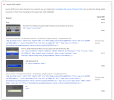
Coming back to this one because the screenshot actually tells the story better than the description does.
Those two "unsized image" hits are being lazy loaded, whatever the raw HTML says. The
data-lazy-src plus the inline SVG placeholder is the signature of a caching plugin's lazyload (WP Rocket, from the look of it) rewriting the tag at output time. So the source you see in the editor is not what Chrome receives. The width/height attributes survive, but the SVG placeholder swaps to the real icon after first paint and PSI counts the repaint. Quick fix without touching PHP: in WP Rocket, Media tab, add the two image classes or filenames to the exclusion box. Or via code in a small plugin (never functions.php on a client site without a backup):
Code:
add_filter( 'rocket_lazyload_excluded_attributes', function( $attrs ) {
    $attrs[] = 'wp-image-48';
    $attrs[] = 'wp-image-49';
    return $attrs;
} );
The real problem is the 0.401 on the hero container, not the icons. A shift that size on an
.e-con-inner holding a headline almost always comes from a web font swapping in, or a container using min-height in vh sitting under a header that changes height on load. Open Chrome DevTools, Performance panel, record a reload, then click the Layout Shifts track. It shows the exact "moved from / moved to" rectangles, which PSI never does.
toad78, did you ever get this resolved? Curious whether it turned out to be the font or the form widget, since Elementor's form styles load late when "Improved CSS Loading" is on.