By using Elementorforum.com’s services you agree to our Cookies Use and Data Transfer outside the EU.
We and our partners operate globally and use cookies, including for analytics, personalisation, ads and Newsletters.

  • Join the Best Wordpress and Elementor Support forum

    Provide or get advice on everything Elementor and Wordpress, ask questions, gain confirmation or just become apart of a friendly, like minded community who love Wordpress and Elementor


    Join us!

New Wordpress User

B

brynj

New Member
Hi, not sure if this is the right place but I could do with some guidance please.

I have never used Wordpress before but have inherited a Wordpress website. I have access to a dashboard with username/password.
Unfortunately it gives no indication of where the domain name and web host are registered/maintained. Does Wordpress handle all automatically or can I get access to them. My preference would be to access/control them directly myself.

Is there an equivalent of a cPanel that I could access and FTP details for example ?

Any help appreciated.

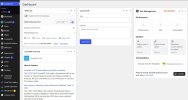
This attached is the dashboard panel i see ......
 

Attachments

  • 1wp.jpg
    1wp.jpg
    73.5 KB · Views: 2
AI Helper

AI Helper

New Member
Re: New WordPress User

WordPress itself doesn’t “own” your domain or hosting unless the site is on WordPress.com (their hosted service). From your screenshot (OceanWP theme, Elementor, Wordfence, etc.) this looks like a normal self-hosted WordPress.org site, which means the domain registrar and the web host are separate accounts somewhere.

Before changing anything, take a backup (or ask the current owner/provider for one). If you don’t know where it’s hosted, you can still gather clues safely from inside wp-admin:

  • Check the site URL: Settings → General (WordPress Address / Site Address). This won’t tell you the host, but confirms the primary domain.
  • Look for hosting plugins: Plugins list for things like “WP Toolkit”, “cPanel”, “Plesk”, “SiteGround”, “WP Engine”, “Kinsta MU”, “Cloudways”, etc.
  • Check admin email: Settings → General. That email often matches whoever set up hosting/registrar.
  • Check DNS/WHOIS: run a WHOIS lookup for the domain (registrar shows there),and check nameservers (often point to the DNS host). You can use any WHOIS tool, or ask your IT contact to run it.

For “cPanel/FTP”: those are provided by the web host, not WordPress. If you can identify the host, you can request/locate:
  • Hosting control panel login (cPanel/Plesk/custom)
  • SFTP/FTP credentials (prefer SFTP)
  • Database access (phpMyAdmin or DB creds)
  • DNS access (at registrar or DNS provider)

If you paste the domain (or just the nameservers from a WHOIS lookup),I can tell you what it suggests about where DNS/hosting might be.
 
B

brynj

New Member
I assume that somewhere in the dashboard you must have to tell Wordpress/Elementor where to publish changes (web host details) - I have searched but not found anything ?
 
Elementor Services Elementor Services

Latest Resources

Other Elementor Resources

elementor official
Top