• Join the Best Wordpress and Elementor Support forum

    Provide or get advice on everything Elementor and Wordpress, ask questions, gain confirmation or just become apart of a friendly, like minded community who love Wordpress and Elementor


    Join us!

Question Help with Tablet responsive view

H

hannesr

New Member
Hey forum,
I'm trying to edit my columns in table mode and make it the same as my phone mode - but it's not working.
Basically i'm not seeing the effect of changing the column % width. Nothing happens. it works in table mode.
What I have are 4 columns, and want to change them to two columns on table mode. So i'm setting the width to 50% but no effect.

A second problem,
I want an icon to rotate 90 degrees in table and in phone mode, Style -> Rotate, and change the table and phone but again nothing happens.

Thanks for yuor help guys
 
nico_belgio

nico_belgio

New Member
Can you post some screenshot of what you mean please?
 
H

hannesr

New Member
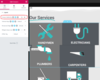
All 6 cubes are "50% width" but obviously they are all over the place, this is in table mode.
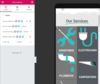
It looks fine on mobile mode and desktop mode..


problem 2)

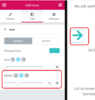
no matter how much i choose to rotate in table or mobile view, the icon doesnt make a difference
 

Attachments

  • 50width.png
    50width.png
    135.8 KB · Views: 709
  • rotate.png
    rotate.png
    32.2 KB · Views: 697
  • 50widthmobile.png
    50widthmobile.png
    142.9 KB · Views: 653
Last edited:
nico_belgio

nico_belgio

New Member
Did you check the padding value of the columns? or the section ones? It could be a problem related to that... i suggest to use Chrome Inspector to see what are the actual value loaded for the elements, so you could identify the source of your problem
 
H

hannesr

New Member
yes changed columns , sections , image and texts all of them to margin and padding 0px, still the same problem with a weird layout

EDIT: Just viewed the page on Chrome - it looks fine. Maybe it's just a view thing with the ELEMENTOR editor.
 
nico_belgio

nico_belgio

New Member
Elementor Editor it's a little bit buggy sometimes. It doesn't render what actually is on the page, and its dynamic nature make a little hard to establish how exactly a responsive element will rendere on page. I suggest you to always try the preview mode after applying changes
 

Latest Resources

Other Elementor Resources

elementor official

Still stuck? Ask the forum

Post your question with a screenshot and a link if you can, and a member will usually reply within a day. Free to join, no sales pitch.

Create a free account
Top