
I
inputchip
New Member
I am trying to add a Gravity Forms product option to a custom single listing product listing page made with Elementor Templates.
The template I made is simply a blank single product listing with the "Woocommerce Add to Cart" button in a single column for testing purposes.
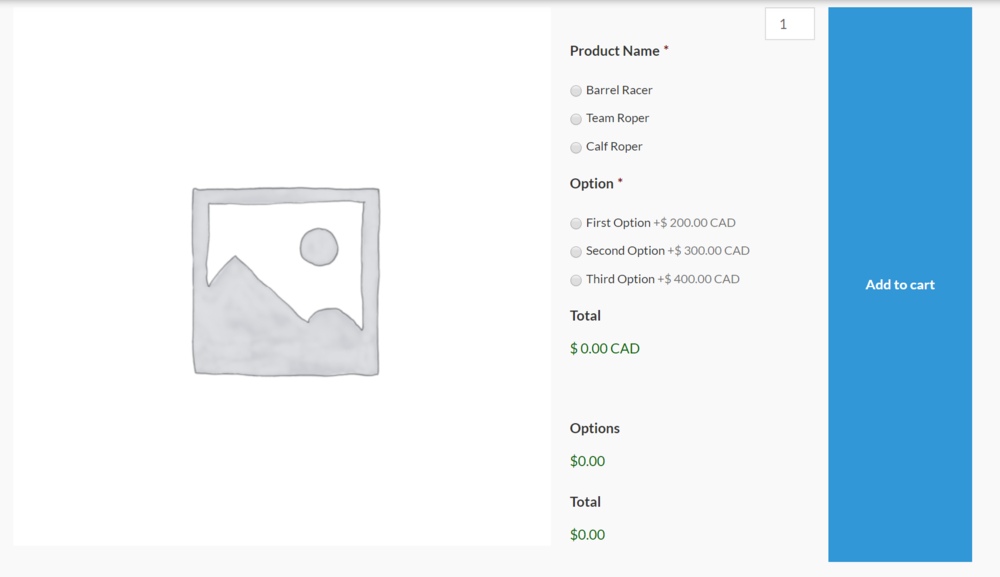
For some reason, the "Add to Cart" button is displaying really tall and I cannot figure out why it is taking on such a large height within the CSS.
When I add the Gravity Form to the default product listing page, it displays the form nicely with a normal size "Add to Cart" button. Comparing the CSS between the two did not help me find the solution.
Any ideas on what is causing the large button and any ideas on how to fix it? Please see the attached images.

The template I made is simply a blank single product listing with the "Woocommerce Add to Cart" button in a single column for testing purposes.
For some reason, the "Add to Cart" button is displaying really tall and I cannot figure out why it is taking on such a large height within the CSS.
When I add the Gravity Form to the default product listing page, it displays the form nicely with a normal size "Add to Cart" button. Comparing the CSS between the two did not help me find the solution.
Any ideas on what is causing the large button and any ideas on how to fix it? Please see the attached images.


