• Join the Best Wordpress and Elementor Support forum

    Provide or get advice on everything Elementor and Wordpress, ask questions, gain confirmation or just become apart of a friendly, like minded community who love Wordpress and Elementor


    Join us!

Changing the theme's anchor colors

M

moonwards

New Member
I have opened up my Hello Elementor Child theme's stylesheet. What I want to do is change the color of all anchor elements, including :visited and :hover. It seems simple enough, it says to put custom css after the comments. I've saved some test changes. But it isn't showing up on the pages.
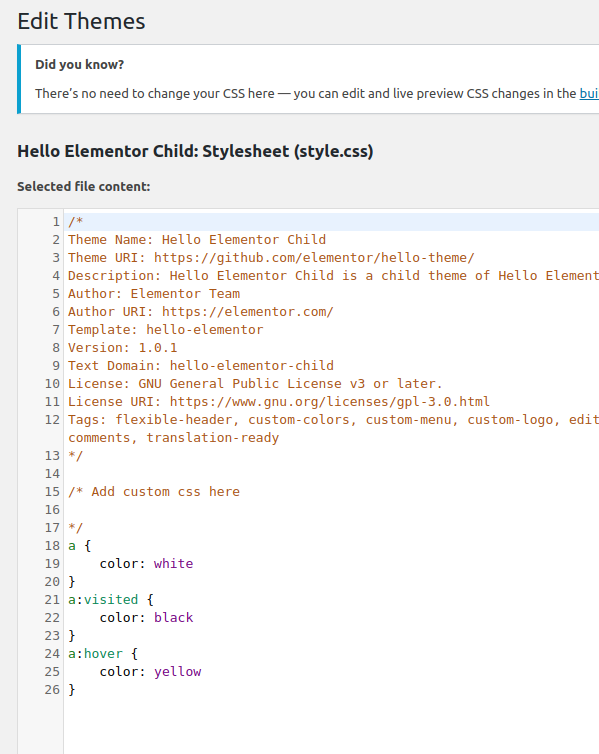
Screenshot from 2019-12-30 15-11-02.png


What am I doing wrong here?
 
sms-design

sms-design

Member
When testing css changes try viewing your site in an incognito window Chrome (Ctrl + Shift + N) once loaded Ctrl + F5.

Close the color declaration with a semicolon ie color: yellow;

You can also add !important after your ie color: yellow !important;

You should also look at the load order of your stylesheets
 
Koni Kodes

Koni Kodes

Member
I agree with @sms-design When I first started coding, I quickly learned that the first thing I should check is if I forgot the semi-colon at the end of the declaration.
Otherwise, it looks like new styles should work.
@moonwards Please let us know how it goes.
 

Latest Resources

Other Elementor Resources

elementor official

Still stuck? Ask the forum

Post your question with a screenshot and a link if you can, and a member will usually reply within a day. Free to join, no sales pitch.

Create a free account
Top