

petergamston
New Member
A complete newbie I have just built my first web site and it is 99.9% complete but I have been stuck for days on the very last thing. I have added a contact form (Using WPForms-lite 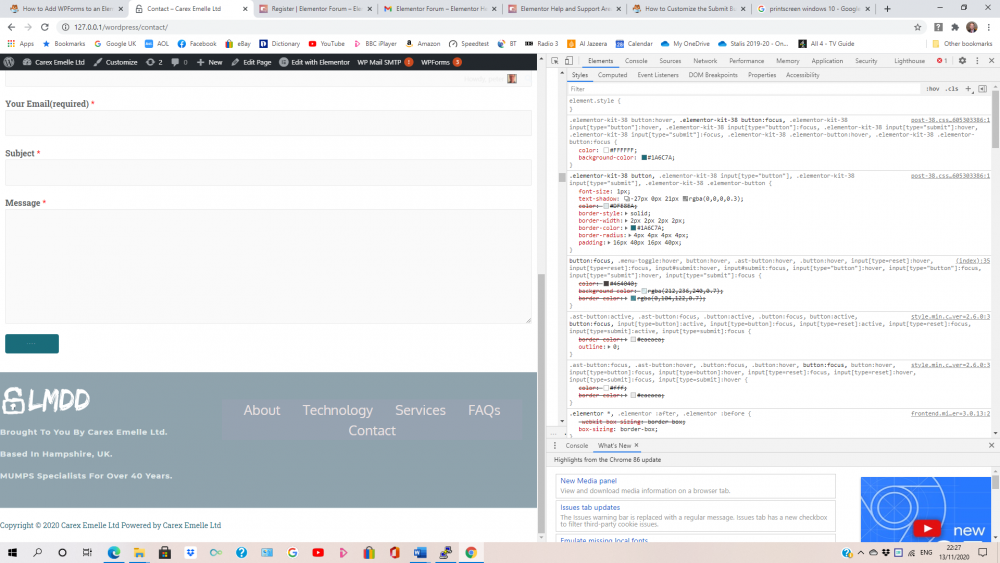 but I've now tried other form plug-ins with the same result) and the text on the submit button is 1px - just looks like dots! Over these days I've read countless articles telling me the default CSS is :
div.wpforms-container-full .wpforms-form button[type=submit] {
background-color: #eee; /* Grey background */
border: 1px solid #ddd; /* Dark grey border */
color: #333; /* Black text color */
font-size: 1em; /* Size of text */
and teaching me how to edit it but it doesn't make a blind bit of difference probably because when I inspect the button I don't see wpforms-form button[type=submit but rather
.elementor-kit-38 button, .elementor-kit-38 input[type="button"], .elementor-kit-38 input[type="submit"], .elementor-kit-38 .elementor-button {
font-size: 1px;
I can edit this to say 10px or simply uncheck the box so as to not specify a font size and low and behold the text is legible but I haven't a clue how to save the change to make it stick or why this is happening to me and apparently nobody else. (Active theme is Astra, all pages edited with Elementor)
div.wpforms-container-full .wpforms-form button[type=submit] {
background-color: #eee; /* Grey background */
border: 1px solid #ddd; /* Dark grey border */
color: #333; /* Black text color */
font-size: 1em; /* Size of text */
and teaching me how to edit it but it doesn't make a blind bit of difference probably because when I inspect the button I don't see wpforms-form button[type=submit but rather
.elementor-kit-38 button, .elementor-kit-38 input[type="button"], .elementor-kit-38 input[type="submit"], .elementor-kit-38 .elementor-button {
font-size: 1px;
I can edit this to say 10px or simply uncheck the box so as to not specify a font size and low and behold the text is legible but I haven't a clue how to save the change to make it stick or why this is happening to me and apparently nobody else. (Active theme is Astra, all pages edited with Elementor)


