
R
regexreggae
New Member
Hey yall,
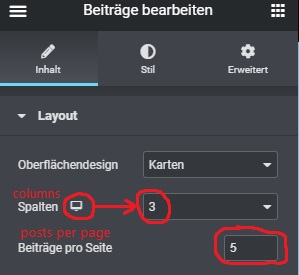
in the post widget one has the option to change no. of columns responsively. However, this option is not given for no. of posts to be shown per page (see pic in attachment for clarity). My goal is to also change this dynamically (responsively/ depending on which type of device). In order to tweak this I need to find this bit of information so I can access it. Unfortunately, all I can find in the source code is:
- in the HTML the respective <div> element has the classes elementor-grid-3, elementor-grid-tablet-2, elementor-grid-mobile-1
- the corresponding CSS has a statement (combined with a media query for mobile devices) grid-template-columns: repeat(1,1fr);
But as you can see all this is about the no. of columns. I need to identify where exactly (and how) the no. of posts per page in the widget is set (5 in the example pic in the attachment) so I can add responsiveness to this manually (using either CSS media queries or some nice little JS, depending on the way and place this attribute is set).
Thx in advance for any hints!
Gary
in the post widget one has the option to change no. of columns responsively. However, this option is not given for no. of posts to be shown per page (see pic in attachment for clarity). My goal is to also change this dynamically (responsively/ depending on which type of device). In order to tweak this I need to find this bit of information so I can access it. Unfortunately, all I can find in the source code is:
- in the HTML the respective <div> element has the classes elementor-grid-3, elementor-grid-tablet-2, elementor-grid-mobile-1
- the corresponding CSS has a statement (combined with a media query for mobile devices) grid-template-columns: repeat(1,1fr);
But as you can see all this is about the no. of columns. I need to identify where exactly (and how) the no. of posts per page in the widget is set (5 in the example pic in the attachment) so I can add responsiveness to this manually (using either CSS media queries or some nice little JS, depending on the way and place this attribute is set).
Thx in advance for any hints!
Gary


