
O
omerrob13
New Member
Hey, I hope everyone had a great day.
I had created a 2 column layout - 1 text column, 1 image column.
The image is set to 100%, and its 2000 px 2000px. At first, it takes 100% of its container, but when I add more content to the second column (and therefore - expanding the height) - The image does not take the full height and width of its container.
How can I make the image take the full height and width although I added to content in the left column?
I am using WordPress btw.
I attach an image - to show my example
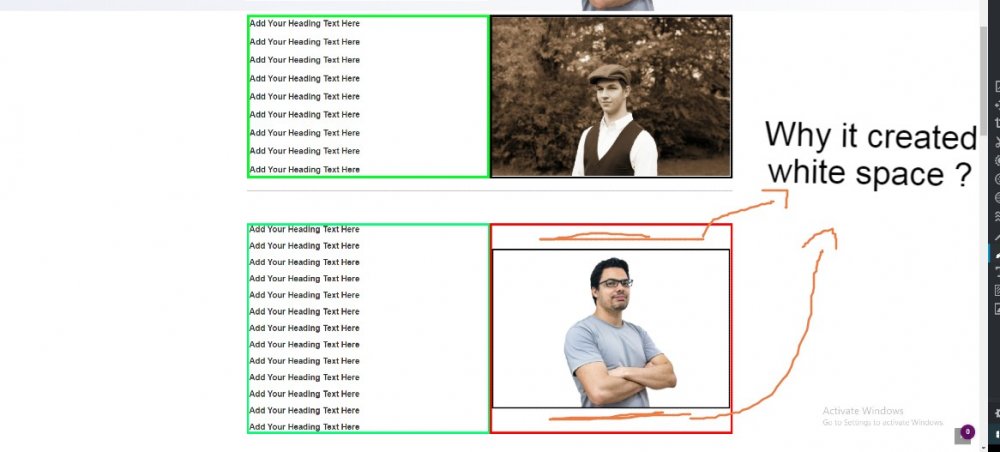
*Both of the columns are in the same container/section.
First example - Image is taking 100% of its container.
Second example - Adding more content to the next column - making it higher :
The image remains the same height.
How can I fix it, making the image take 100% of its container even If I adding more content?
Thank you, hope you have an amazing day.
I had created a 2 column layout - 1 text column, 1 image column.
The image is set to 100%, and its 2000 px 2000px. At first, it takes 100% of its container, but when I add more content to the second column (and therefore - expanding the height) - The image does not take the full height and width of its container.
How can I make the image take the full height and width although I added to content in the left column?
I am using WordPress btw.
I attach an image - to show my example
*Both of the columns are in the same container/section.
First example - Image is taking 100% of its container.
Second example - Adding more content to the next column - making it higher :
The image remains the same height.
How can I fix it, making the image take 100% of its container even If I adding more content?
Thank you, hope you have an amazing day.


